Set Custom Icons For Unity Scriptable Objects
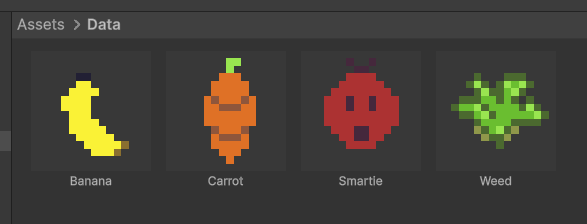
Here’s how to easily set custom icons for your Scriptable Objects in Unity with this attribute! It makes it easy to identify and also get a preview of your scriptable objects from the project view.
I frequently use scriptable objects to define game data (things like items, skills, crafting recipes, etc) and while I make the names human readable it’s still easier to just find things visually with an icon.

Unity allows you to set icons with the gizmos folder but the icon has to match the scriptable object name. That’s clunky and not very efficient when you have hundreds of items from a spritesheet. There’s also the [Icon] attribute but that only lets you set an icon for that type of scriptable object, not change it dynamically based on the content.
First we create the editor script that draws the icons:
using UnityEngine;
using UnityEditor;
using System.Reflection;

namespace CustomIcons.Editor
{
    [InitializeOnLoad]
    public static class ScriptableObjectIconDrawer
    {
        static ScriptableObjectIconDrawer()
        {
            EditorApplication.projectWindowItemOnGUI += DrawCustomIcon;
        }

        private static void DrawCustomIcon(string guid, Rect selectionRect)
        {
            string assetPath = AssetDatabase.GUIDToAssetPath(guid);
            Object asset = AssetDatabase.LoadAssetAtPath<Object>(assetPath);

            if (asset == null || !(asset is ScriptableObject scriptableObject))
                return;

            Sprite icon = GetIconFromScriptableObject(scriptableObject);
            if (icon == null)
                return;

            Rect iconRect = new Rect(selectionRect.x, selectionRect.y, selectionRect.width, selectionRect.width);

            if (selectionRect.height > selectionRect.width)
            {
                iconRect = new Rect(selectionRect.x, selectionRect.y, selectionRect.width, selectionRect.width);
            }
            else
            {
                float size = selectionRect.height;
                iconRect = new Rect(selectionRect.x, selectionRect.y, size, size);
            }

            if (icon.texture != null)
            {
                EditorGUI.DrawRect(iconRect, new Color(0.22f, 0.22f, 0.22f));

                Rect textureRect = icon.textureRect;
                Rect uv = new Rect(
                    textureRect.x / icon.texture.width,
                    textureRect.y / icon.texture.height,
                    textureRect.width / icon.texture.width,
                    textureRect.height / icon.texture.height);

                GUI.DrawTextureWithTexCoords(iconRect, icon.texture, uv, true);
            }
        }

        private static Sprite GetIconFromScriptableObject(ScriptableObject scriptableObject)
        {
            System.Type type = scriptableObject.GetType();

            //look for a field with the ScriptableObjectIconAttribute
            FieldInfo[] fields = type.GetFields(BindingFlags.Public | BindingFlags.NonPublic | BindingFlags.Instance);
            foreach (FieldInfo field in fields)
            {
                if (field.FieldType == typeof(Sprite) &&
                    System.Attribute.IsDefined(field, typeof(ScriptableObjectIconAttribute)))
                {
                    return field.GetValue(scriptableObject) as Sprite;
                }
            }
            return null;
        }
    }
}
Then we create a custom attribute so that the editor script knows what to look for. In this case it should be called ScriptableObjectIconAttribute
using System;
using UnityEngine;

namespace CustomIcons
{
    // Marks a Sprite field to be used as the icon for this ScriptableObject in the Project view.
    // Only one field per ScriptableObject should have this attribute.
    [AttributeUsage(AttributeTargets.Field, AllowMultiple = false)]
    public class ScriptableObjectIconAttribute : PropertyAttribute
    {
    }
}
And to use it just put the [ScriptableObjectIcon] on a Sprite field in your scriptable object.
using UnityEngine;

namespace CustomIcons
{
    [CreateAssetMenu(menuName = "CustomIcons/Example ScriptableObject")]
    public class ExampleScriptableObject : ScriptableObject
    {
        public string DisplayName;
        [ScriptableObjectIcon]
        public Sprite CustomIcon;
    }
}This makes it very handy to use the main ‘icon’ of your item, recipe, etc as the icon for the scriptable object. Of course, you can set a field that is only used for the icon as well.
Hope this helps! If you want to check out more game dev content from me, check out this post about my top tools for staying organized and productive in game development!

Jonathan
Hey there, I’m Jon! I love landscape photography which is why I travel all the time! On my blog I’ll share all the best spots for epic sunsets and sunrises as well as some photography tips and tricks. I also have a interest in game design so you’ll find the occasional post about that too. Thanks for visiting!